TortoiseHG
writing together – collaborative editing is easy
Sa, 08/07/2010 - 13:56 — Draketo→ comment to The next wave in scholarly word processors?
What I’d like to see is more people using version tracking systems.
With these you have a discussion which can be merged easily when it gets branched. I use it for anything I do, and I could use it together with an only-windows-and-GUI user with ease, installing TortoiseHG for both and Lyx for him (LaTeX made easy – you don’t have to see the sources).
- Login to post comments
- Weiterlesen
A short introduction to Mercurial with TortoiseHG (GNU/Linux and Windows)
Do, 05/28/2009 - 01:13 — DraketoNote: This tutorial is for the old TortoiseHG (with gtk interface). The new one works a bit differently (and uses Qt). See the official quick start guide. The right-click menus should still work similar to the ones described here, though.
Downloading the Repository
After installing TortoiseHG, you can download a repository to your computer by right-clicking in a folder and selecting the menu "TortoiseHG" and then "Clone" in there (currently you still need Windows for that - all other dialogs can be evoked in GNU/Linux on the commandline via "hgtk").
Right-Click menu, Windows:

- Login to post comments
- Weiterlesen
Kurze Einführung in Mercurial mit TortoiseHG (GNU/Linux und Windows)
Mi, 04/15/2009 - 07:46 — DraketoNote: This tutorial is for the old TortoiseHG (with gtk interface). The new one works a bit differently (and uses Qt). See the official quick start guide. The right-click menus should still work similar to the ones described here, though.
Das Repository herunterladen
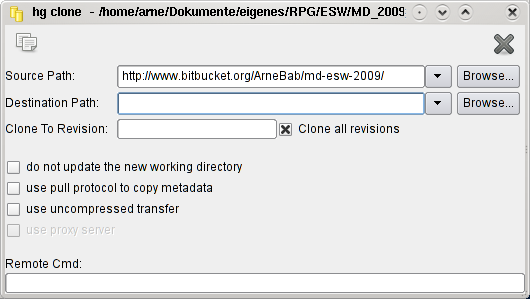
Wenn du TortoiseHG installiert hast, kannst du dir das Repository auf den Rechner laden, indem du in einem Ordner rechtsklickst und im Menü "TortoiseHG" die Option "Clone" wählst (Aktuell brauchst du für den Dialog noch Windows, die anderen gibt es auch in GNU/Linux).
Rechtsklick-Menü, Windows:
Clone, GNU/Linux:

Diese Seite nutzt Cookies. Und Bilder. Manchmal auch Text. Eins davon muss ich wohl erwähnen — sagen die meisten anderen, und ich habe grade keine Zeit, Rechtstexte dazu zu lesen…
