Light
AlphaGo uses more power than 3000 humans
Do, 05/11/2017 - 21:42 — DraketoUpdate 2017-11: Alpha Go Zero consumes just about 1-2 kW. I definitely underestimated the speed of development — by around factor 20. Alpha Go Zero only consumes as much energy as 10-20 humans.
Update 2017: OpenAI used a single machine to beat a Dota champion → DENDI 1v1 vs BOT AI - TI7 DOTA 2. I may be underestimating the speed of development.
AlphaGo recently defeated the world Go champion.
- Login to post comments
- Weiterlesen
Elegant commandline argument parsing on the shell
Mo, 04/24/2017 - 16:42 — DraketoParsing command line arguments on the shell is often done in an ad-hoc fashion, growing unwieldy as time goes by, but there are tools to make that elegant. Here’s a complete example.
I use this in the conf project (easy setup of autotools projects). It builds on the great solution by Adam Katz.
- Login to post comments
- Weiterlesen
Writing a commandline tool in Fortran
Mo, 04/10/2017 - 22:37 — DraketoHere I want to show you how to write a commandline tool in Fortran. Because Fortran is much better than its reputation — most of all in syntax. I needed a long time to understand that — to get over my predjudices — and I hope I can help you save some of that time.1
This provides a quick-start into Fortran. After finishing it, I suggest having a look at Fortran surprises to avoid stumbling over differences between Fortran and many other languages.
Table of Contents
-
After I finished my Diploma, I thought of Fortran as "this horribly unreadable 70th language". I thought it should be removed and that it only lived on due to pure inertia. I thought that its only deeper use were to provide the libraries to make numeric Python faster. Then I actually had to use it. In the beginning I mocked it and didn’t understand why anyone would choose Fortran over C. What I saw was mostly Fortran 77. The first thing I wrote was "Fortran surprises" — all the strange things you can stumble over. But bit by bit I realized the similarities with Python. That well-written Fortran actually did not look that different from Python — and much cleaner than C. That it gets stuff done. This year Fortran turns 60 (heise reported in German). And I understand why it is still used. And thanks to being an ISO standard it is likely that it will stick with us and keep working for many more decades. ↩
- Login to post comments
- Weiterlesen
adapt plainnat bibtex natbib style to only show the url if no doi is available
Di, 04/04/2017 - 08:57 — DraketoSince the URL in a bibtex entry is typically just duplicate information when the entry has a DOI, I want to hide it.1
Here’s how:
- Login to post comments
- Weiterlesen
EME in standards would mount enormous pressure on all free systems
Sa, 03/04/2017 - 21:19 — Draketo→ comment to On EME in HTML5 by Tim Berners-Lee, taking a social angle to the problems of DRM via EME in web standards.
Dear Tim,
The previous commenters already addressed every technical comment I wanted to add. There is only one aspect I still feel missing here:
If you give EME your blessing, the social pressure on all free software communities to add proprietary blobs in their shipped browsers will rise enormously, because otherwise the proprietary developers will accuse them of not following the standard.
- Login to post comments
- Weiterlesen
Live stream from the Guile devroom at FOSDEM 2017!
So, 02/05/2017 - 09:07 — DraketoUpdate: The recording is now online at ftp.fau.de/fosdem/2017/K.4.601/naturalscriptwritingguile.vp8.webm
Here’s the stream to the Guile devroom at #FOSDEM: https://live.fosdem.org/watch/k4601
Schedule (also on the FOSDEM page):
- 09:45 10:30: Small languages panel Christopher Webber, Ludovic Courtès, Etiene Dalcol, Justin Cormack
- 10:30 11:00: An introduction to functional package management with GNU Guix Ricardo Wurmus
- Login to post comments
- Weiterlesen
News of the day — and using Freenet as decentralized, pseudonymous communication backend for applications
Fr, 02/03/2017 - 21:17 — DraketoThis is a proposal I wrote for the NLnet Open call for funding 2016-12. It got into the short list but was not selected, so I’m sharing it here. Maybe it spikes your interest or serves as inspiration for something exciting you want to realize with Freenet. I still plan to do this, but in hobby-time it will likely take a few years to realize instead of the 6 months I had planned. Initial work is available in pyFreenet/babcom_cli
The project
- Login to post comments
- Weiterlesen
Organize!
Di, 01/31/2017 - 19:42 — DraketoOrganize! … That’s the thing that has a chance of preventing all of this, and of saving the most lives when that fails. — Yonatan Zunger
I’m not sure it is a good idea to reply to this article. I am doing it anyway, because it’s already on record that I read this article. Likely even at what pace I read it.
Thank you for this article, Yonatan Zunger. This is frightening, but in an important way. And organized well enough that the essential ideas stick. Important ideas.
With images of cute animals. Added with reason.
→ What “Things Going Wrong” Can Look Like ←
Reading deeply recommended.
- Login to post comments
Building the darknet one ref at a time
Mo, 01/30/2017 - 19:42 — Draketo Building the darknet one ref at a time. That’s what we have to do. If you invite three people⁰ to Freenet and help those of your friends with similar interests to connect¹², and when the people you invited then do the same, we get exponential growth.
⁰: To invite a friend into Freenet, you can send an email like this:
Let us talk over Freenet, so I can speak freely again.
¹: Helping your friends to connect works as follows:
- Login to post comments
- Weiterlesen
In Circles / The memory of time
So, 12/18/2016 - 17:03 — DraketoI feel the time pass in our circles,
each year another one changed,
a head has turned white,
a hand has gone wry,
growing older as time passes by.
In our circle the time is a slide-show,
each year adds a picture or two,
and our memories in vivid colors
show the changes within me and you.
- Login to post comments
- Weiterlesen
Renaming a Mercurial branch with the evolve extension
Do, 11/17/2016 - 23:36 — DraketoShort version (rename from $OLD to $NEW):
ROOT="$(hg id -qr 'first(roots(branch('$OLD')))')"
MSG="$(hg log -r $ROOT -T '{desc}')"

hg update $ROOT
hg branch $NEW
hg commit --amend -m "$MSG"
hg evolve --all
Mercurial records in which named branch a commit was created. This can be inconvenient when you choose temporary branch names like "foo" or "justworkdamnit".
The evolve extension enables safe, collaborative history editing which removes this inconvenience while preserving the reliability guarantees of Mercurial.
Here I show in a quick example how to rename a branch in Mercurial using the evolve extension.
You can use this method for all changes which you did not transfer elsewhere yet (they must be in draft or secret phase).
Note (2016): The evolve extension is still in testing. Do not use it for production yet. If you want to help stabilizing it, please join evolve-testers. I’ve been using it for more than a year, but I know how to fix things when I hit a bug in the evolve extension.
- Login to post comments
- Weiterlesen
Thanks for all the fish
Mo, 10/31/2016 - 16:42 — DraketoAGU publications published "The world's biggest gamble", a short commentary on how to go on with climate change.
- Earth’s Future: The world's biggest gamble (Open Access: cc by)
I am hard pressed not to become sarcastic. Not because the commentary is wrong. It’s spot on. But because we, as a species, are …
I’ll stop speaking my mind for now. Let’s hope that hope wins against frustration and our children don’t have to pay too dearly for the idiocy of my generation and the generation before.
Oh well, Happy Halloween and enjoy Samhain.
- Login to post comments
Replacing man with info
Do, 10/13/2016 - 21:05 — Draketo
GNU info is lightyears ahead of man in terms of features, with sub-pages, clickable links, topic-spanning search, clean html- and latex-export and efficient interactive navigation.
But man pages are still the de-facto standard for getting quick information on a GNU/Linux system.
This guide intends to help you change that for your system. It needs GNU texinfo >= 6.1.
Update: If you prefer vi-keys, adjust the function below to call
info --vi-keysinstead of plaininfo. You could then call that functioniv☺
- Login to post comments
- Weiterlesen
Storm through Rock
Do, 10/06/2016 - 17:42 — DraketoTo the melody of Firesoul by Aryana. Text written 2016 by Draketo (Arne Babenhauserheide). A filk on Soul of Wind, for life is change and change reflects in living songs.
  e                        G
I sigh in the wind, for my soul wants to fly,
   a                e             D
to wing through the storm just to look at the sky
  e                        D           e
but choices are made and I stand by my word,
    a             e       D         e
and don’t care if anyone but me has heard.
I move on my path, I’ve chosen my way,
each crossing takes possible futures away,
but never to choose just worsens my need,
and a choice fast retracted does not make a street.
- Login to post comments
- Weiterlesen
Soul of Wind
Sa, 09/24/2016 - 13:05 — DraketoTo the melody of Firesoul by Aryana. Text written around 2007 by Draketo (Arne Babenhauserheide).
  e                           G
I dance with the wind, for my soul needs to fly,
  a                e             D
I move through the storm just to look at the sky
  e                      D           e
I stay of my own will, I need to fly free,
    a            e           D           e
and just one can bind me and that one is me.
I crave for the gusts, the wind on my wings,
In flight there’s no border, no queens and no kings,
I go where I want and you can’t keep me in,
I need to stay moving, leave friends and leave kin.
I know where I’m going, I’ve chosen my way,
Must heed only myself, whatever you say,
Don’t mourn for my passing, we might meet again,
just savor each moment, for struggling’s in vain.
- Login to post comments
- Weiterlesen
I w̶a̶s̶ t̶a̶r̶g̶e̶t̶e̶d̶ got hit by an attack on GnuPG/PGP
Fr, 09/23/2016 - 21:42 — DraketoUpdate: Might not actually be targeted. See Evil 32. Thanks to Ximin Luo for giving me more peace of mind!
Update: I’m not the only one hit by this. Here’s a conversation on GNU social with more people hit - though no one else reported yet having two keys faked and cross-signed.
Update: At the very least you should do this: echo keyid-format long >> ~/.gnupg/gpg.conf
On the 29th of August a colleague asked me “which key should I use to encrypt to you?” I was confused, because I only have one key for that email address. So he showed me the keys he saw:
$ gpg2 --list-keys --fingerprint arne.babenhauserheide
-------------------------------
pub   2048R/A70DA09E 2011-10-07 [expires: 2016-10-05]
uid                  Arne Babenhauserheide <arne.babenhauserheide@kit.edu>
sub   2048R/39829E5F 2011-10-07 [expires: 2016-10-05]

pub   2048R/A70DA09E 2014-06-16 [revoked: 2016-08-16]
uid                  Arne Babenhauserheide <arne.babenhauserheide@kit.edu>
Table of Contents
- Login to post comments
- Weiterlesen
pyFreenet 0.4.1 with auto-spawn support in fcpupload
Do, 08/25/2016 - 22:36 — DraketoI just put up a new pyFreenet release (github):
If you have Python3 and pip >= 8 you can get it with pip3 install -U --user --egg pyFreenet3. It provides a cleaned up fcpupload script with --spawn support (requires GNU/Linux):
pip3 install -U --user --egg pyFreenet3
echo 1 > testfile
fcpupload --spawn --fcpPort 9486 testfile
- Login to post comments
- Weiterlesen
If you do what you love doing, it becomes what you are good at
Mo, 08/01/2016 - 07:12 — Draketo→ comment to You’re Not Meant To Do What You Love. You’re Meant To Do What You’re Good At. by Brianna Wiest, who arguments that the skills of people are "a blueprint of their destiny". For support she describes experience with people who try to do something they do not actually enjoy doing.
This whole argument sits on the assumption that skills develop somehow on their own.
Skills develop, because you use them and train them. So if you do what you love doing (note the nuance!) and train to improve, then — except in rare cases — this becomes what you are good at.
- Login to post comments
- Weiterlesen
Are there 10x programmers?
Di, 06/28/2016 - 21:09 — Draketo→ An answer I wrote to this question on Quora.
Software Engineering: What is the truth of 10x programmers?
Do they really exist?…
Let’s answer the other way round: I once had to take heavy anti-histamines for three weeks. My mind was horribly hazy from that, and I felt awake only about two hours per day.
- Login to post comments
- Weiterlesen
letterblock passwords: secure, memorable, easy to type
Fr, 06/17/2016 - 20:23 — DraketoUpdate 2021: An improved version that is viable for analog password creation can be found at Letterblock Diceware Passwords.
Do you want to have secure passwords which are memorable and easy to type? Did you use diceware just to find out that the rate of typos when writing 6 words with 30 letters in total without seeing what you type can be aggravating — especially when you have to enter your password several times a day?
The algorithm here generates secure Letterblock passwords which are easy to type and to remember. Try it:
npm install securepasswordsThere is also a version in Python and one in wisp Scheme.
A major part of this article is concerned with a security estimate of the generated passwords, but firstoff, here’s an example of a password which should survive an attack leveraging all smartphones on the planet until at least 2021 at the current development speed of technology:
hXFV!4Vgf-LrgS
And here’s one which should outlast a type II civilization:
HArw-CUCG+AxRg-WAVN-5KRC*1bRq.v9Tc+SAgG,QfUc
Let’s ramp up security of passwords while making them easier to remember.
Update Also see Keylength - ECRYPT II report on key sizes. The report provides a clean overview of several different recommendations. In short: Use 128 bits. With the method shown here this is equivalent to using 5 blocks of 4 letters (length 20).
- Login to post comments
- Weiterlesen
Conveniently merge a NEWS file without conflicts
Do, 06/09/2016 - 19:42 — DraketoWriting a NEWS file (a list of changes per version, targeted at end-users) significantly reduces the effort for doing a release: To write your release notes, just copy the latest entries from the NEWS file into a message. It is one of the gems in the GNU coding standards: Simple yet extremely useful. (For a detailed realization, refer to the Perl Specification for CPAN Changes files.)
However when you’re developing features in parallel, for example by using a pull-request workflow and requiring contributors to update the NEWS file, you will often run into merge conflicts. Resolving these takes time, though the resolution is trivial: Just use the lines from both heads.
To resolve the problem, you can set your version tracking system to use union-merge for NEWS files.
- Login to post comments
- Weiterlesen
Why Python 3?
Do, 06/09/2016 - 07:06 — DraketoAt the Institute we use both Python 2 and Python 3. While researching the current differences (Python 3.5, compared to Python 2.7), I found two beautiful articles by Brett Cannon, the current manager of Python, and summarized them for my work group.
The articles:
- Why Python 3: Why Python3 exists
- Why use 3: How to pitch Python 3 to Management
The relevant points for us1 are the following:
-
I have summarized them because I can not expect scientists (or other people who only use Python) to read the full articles, just to decide what they do when they get the channce to tackle a new project. ↩
- Login to post comments
- Weiterlesen
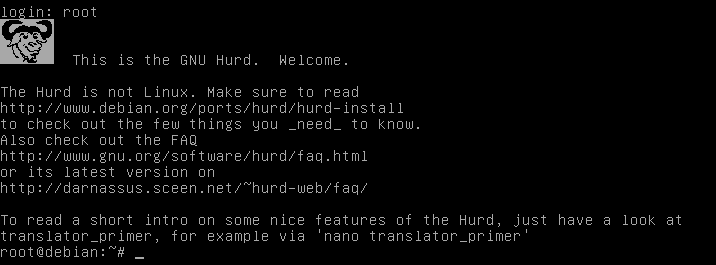
How to run your own GNU Hurd (in 140 letters)
Mi, 06/08/2016 - 19:42 — DraketoDon’t want to rely on other’s opinions about the Hurd? How to run your own GNU Hurd, in 140 letters:
wget http://people.debian.org/~sthibault/hurd-i386/debian-hurd.img.tar.gz; tar xf de*hu*gz; qemu-system-x86_64 -hda de*hu*g -m 1G
- Login to post comments
- Weiterlesen
Which language is best, C, C++, Python or Java?
Sa, 06/04/2016 - 18:38 — DraketoMy answer to the question about the best language on Quora. If you continue reading from here, please stick with me to the end. Ready to read to the end? Enjoy the ride!
My current answer is: Scheme ☺ It gives me a large degree of freedom to explore ways to program which were much harder hard to explore in Python, C++ and Java. That’s why I’m currently switching from Python to Scheme.1
But depending on my current step on the road to improve my skills2 and the development group and project, that answer might have been any other language — C, C++, Java, Python, Fortran, R, Ruby, Haskell, Go, Rust, Clojure, ….
-
Apprenticeship Patterns — Guidance for the Aspiring Software Craftsman ↩
- Login to post comments
- Weiterlesen
I finally got the Freenet junit testsuite to run on Gentoo
Sa, 04/02/2016 - 14:10 — Draketo
For years I developed Freenet partially blindfolded, because I could not get the tests to actually run on my Gentoo box.
As of today, that’s finally over: The testsuite runs successfully. My setup is still unclean, but it finally works. No more asking other contributors to run the tests for me.
To reproduce:
-
The image of the blindfolded dog (original size) is from Takuma Kimura (photones), published on Flickr under CreativeCommons attribution sharealike (by-sa). ↩
- Login to post comments
- Weiterlesen
Transition to a stronger GnuPG key
Mi, 03/30/2016 - 23:32 — DraketoSummary: replace my old key:
6B05 41F0 94FF 2163 6FBA
2433 3307 469B FE96 C404
with my new key:
F34D 6A12 35D0 4903 CD22
D5C0 13EF 8D45 2403 C3EB — and use GnuPG.
I am transitioning my GnuPG1 key from an old 1024-bit key to a stronger 4096-bit key. The old key will continue to be valid for some time, but I prefer all new correspondance to be encrypted in the new key, and will be making all signatures going forward with the new key.
The old key, which I am transitioning away from, is:
sec   1024D/FE96C404 2002-02-04
  Key fingerprint = 6B05 41F0 94FF 2163 6FBA
                    2433 3307 469B FE96 C404
The new key, to which I am transitioning, is:
sec   4096R/2403C3EB 2016-01-04
  Key fingerprint = F34D 6A12 35D0 4903 CD22
                    D5C0 13EF 8D45 2403 C3EB
The transition document below is signed with both keys to validate the transition.
If you have signed my old key, I would appreciate signatures on my new key as well, provided that your signing policy permits that without reauthenticating me.
-
For additional information about GnuPG, see Email Self-Defense: A guide to fighting surveillance with GnuPG encryption. ↩
- Login to post comments
- Weiterlesen
BitBucket got big on Mercurial — until they got bought by Atlassian
Mi, 02/24/2016 - 21:44 — DraketoA comment on largefile support missing in BitBucket, despite being a much-requested feature since 2012.
Note that it’s not Atlassian which got big with Mercurial. It’s Bitbucket which got big with Mercurial, and it was later bought by Atlassian.
- Login to post comments
- Weiterlesen
I agree with just one of the 10 commandments of judaism and christianity
So, 02/21/2016 - 15:29 — DraketoMany christians and many people who talk about “western christian values” like to say that the 10 commandments are universal: everyone can agree with them. So I checked that. I take them by their name: are they suitable as commandments? Not as a fuzzy general guideline, but as binding rules and a foundation for a shared culture?
(1.0) I am god who lead you from slavery in egypt → uhm, no?
(1.1) You shall not have other gods → uhm, why?
- Login to post comments
- Weiterlesen
The Freenet social trust graph
So, 02/14/2016 - 12:50 — DraketoAre trust relationships different in anonymous networks?
- Login to post comments
- Weiterlesen
Freenet for Journalists, funding proposal
Sa, 02/13/2016 - 18:07 — DraketoThis is a funding proposal I sent to Open Technology Fund to make Freenet suitable for Journalists and their sources. Sadly it got rejected, but maybe it helps future proposals.
Project name: Freenet for Journalists
Duration: 24 months
Amount: 800000
Contact name: Arne Babenhauserheide
Contact email: arne_bab -ät- web -punkt- de
Descriptors
- Status: It's basically done.
- Login to post comments
- Weiterlesen

Diese Seite nutzt Cookies. Und Bilder. Manchmal auch Text. Eins davon muss ich wohl erwähnen — sagen die meisten anderen, und ich habe grade keine Zeit, Rechtstexte dazu zu lesen…